Desk Decorating Ideas for a Spooky Office Cubicle

Create a spooky office cubicle with Halloween desk decor ideas that keep your workspace usable, tidy, and mindful of workplace safety.
Security researchers worldwide are warning of a large-scale brute force attack underway, using nearly 2.8 million IP addresses to attempt to guess login credentials for a variety of network devices, including those from Palo Alto Networks, Ivanti, and SonicWall.
A brute force attack occurs when a threat actor attempts to log in to an account or device multiple times using multiple usernames and passwords until they find the correct combination. Once they have the correct credentials, they can take control of the device or gain access to the network.
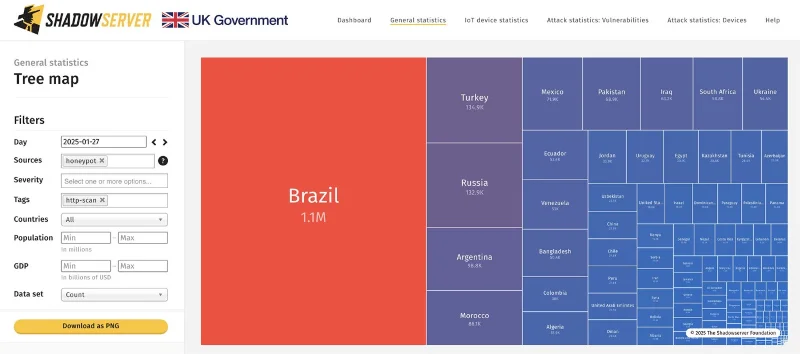
According to a new report from threat monitoring platform The Shadowserver Foundation, there has been a brute force attack going on since last month, using nearly 2.8 million source IP addresses per day to carry out the attacks.
The majority of those IP addresses (1.1 million) come from Brazil, followed by Turkey, Russia, Argentina, Morocco, and Mexico. But overall, there are a wide range of countries involved.
The primary targets are edge security devices such as firewalls, VPNs, gateways, and other security components, which are often directly connected to the internet to support remote access.
The devices carrying out these attacks are mainly routers and IoT devices from MikroTik, Huawei, Cisco, Boa, and ZTE, which are often compromised by large-scale malware botnets. The Shadowserver Foundation confirmed that this activity has been going on for some time, but has recently suddenly increased in scale.
ShadowServer also said that the attack IP addresses were distributed across multiple networks and Autonomous Systems (AS), and were likely a botnet or a residential proxy network-related operation.
Residential proxies are IP addresses assigned to individual customers by Internet Service Providers (ISPs), making them attractive to cybercriminals, data collection, geo-restriction bypass, advertising verification, online transactions, and more.
These proxies route internet traffic through residential networks, making users appear like regular family members instead of bots, data collectors, or hackers.
Gateway devices like those targeted in this operation can be used as proxy exit nodes in residential proxy operations, routing malicious traffic through an organization's corporate network.
Measures to protect devices from brute force attacks
To protect edge devices from brute force attacks, the following steps should be taken:
Additionally, keeping your device updated with the latest firmware and security patches is important to eliminate vulnerabilities that attackers can abuse to gain initial access.
Create a spooky office cubicle with Halloween desk decor ideas that keep your workspace usable, tidy, and mindful of workplace safety.
Plan a recognizable Halloween 2026 look with pop culture costumes inspired by Spider-Man, Supergirl, Toy Story 5, Moana, Mario, and Wednesday.
Sort leftover Halloween candy safely, share or repurpose sealed treats, and choose food use or compost for pumpkins based on their condition.
Compare workplace Halloween costume choices by respect, dress code, mobility, and safety—and learn when a subtle accessory or a policy check is the better option.
Find a couples costume that fits your style, budget, and comfort level, from Addams Family classics to original inside-joke duos.
Need a last-minute high school Halloween costume? Compare 10 easy closet-based ideas by prep time, comfort, school-day practicality, and simple safety checks.
Use a simple 2026 Halloween decorating timeline for indoor décor, outdoor displays, and fresh pumpkins, with practical adjustments for weather and events.
Mix five vivid, approachable Halloween cocktails with measured recipes, simple prep tips, and an alcohol-free option for your party guests.
Find 15 office-friendly Halloween costume ideas for 2026, with practical checks for dress codes, respectful themes, comfort, and workplace safety.
Plan a fun elementary school Halloween party with easy crafts, games, inclusive treats, costume tips, and a sample 75-minute classroom schedule.








