Meta Wants Users to Ditch CapCut and Use Its New Video Creation App

Meta is looking to compete with CapCut with its latest app. The video editing app Edits is now available worldwide for Android and iOS devices .

Edits is a free app with some cool features.

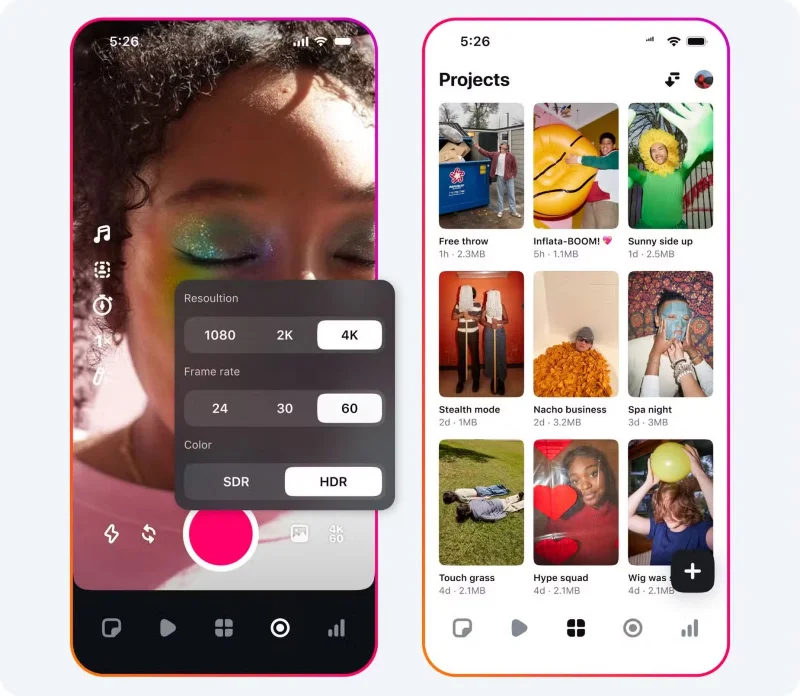
The free Edits app offers a surprisingly robust feature set. You can record videos up to 10 minutes long and start editing right away. The app also lets you keep track of all your drafts and videos in one place, making it easy to juggle multiple projects.

When you're done, you can share the results to Instagram and other social networks in 1080p resolution. A great plus is that there is no watermark on any of the videos.

Meta Wants Users to Ditch CapCut and Use Its New Video Creation App
Features of Edits app

During editing, you can edit with frame-by-frame precision. There are settings for resolution, frame rate, dynamic range, and upgraded flash and zoom controls.

It's no surprise that the app has an AI feature that brings images to life. There's also a green screen or video overlay option.

To further customize your video, you can choose from fonts, sound effects, video filters, stickers, and more. You can also enhance audio and remove background noise. Subtitles are automatically generated and can also be customized.

Other features include a live insights dashboard, analytics on follower and non-follower engagement, and better understanding of what influences engagement.

Overall, the app looks very polished and will provide another great option for content creators and everyday fans who love making videos.

Meta says it plans to add more features in the future. Some of those features include keyframes, collaboration with others, and additional customization options.

A response to ByteDance and CapCut

Meta Wants Users to Ditch CapCut and Use Its New Video Creation App

Edits was first announced in January 2025, which seems like a long time ago, at least in the tech world.

Just days before its announcement, CapCut was removed from the App Store along with the wildly popular social network TikTok in a matter of hours. But the long-term future of both remains up in the air.

While the situation has changed a bit, Meta still saw fit to launch Edits. While it provides a great way for Instagram fans to quickly edit and upload videos while watching the results, it could easily attract TikTok and YouTube Shorts fans looking for a different way to edit videos. And if ByteDance somehow doesn’t find a way out of its situation, Meta will be happy to reap the rewards of new users.

One big advantage of Edits is that all videos are exported without a watermark. You'll need a $9.99 monthly subscription to do that on CapCut.

And if you're looking for something other than Edits or CapCut, check out these great video editing apps .

Leave a Comment

Can Large Format Printing Ever Be Sustainable? The Answer Is Changing Fast

Can Large Format Printing Ever Be Sustainable? The Answer Is Changing Fast

Large format printing has long faced criticism for its environmental impact. Traditional substrates, solvent-based inks, and short-lived promotional campaigns have all contributed to the perception that eye-catching graphics come at a high environmental cost.

What Young Riders Should Know About Moving Their Motorcycles Across Cities

What Young Riders Should Know About Moving Their Motorcycles Across Cities

Long-distance travel can involve heavy traffic, changing weather conditions, and rider fatigue. If you are also dealing with the responsibilities of moving home, such as packing belongings or coordinating accommodation, a long ride may add unnecessary pressure to an already busy schedule.

Solving Microsoft Teams Shortcut Error Not Opening

Solving Microsoft Teams Shortcut Error Not Opening

Tired of Microsoft Teams shortcut error preventing you from opening the app? Follow our expert, step-by-step guide with the latest fixes for instant resolution. Works on Windows, Mac & web – no tech skills needed!

Solving Microsoft Teams Task Management Sync Error

Solving Microsoft Teams Task Management Sync Error

Tired of Microsoft Teams Task Management Sync Error halting your workflow? Follow our proven, step-by-step fixes to resolve sync issues fast and restore seamless task collaboration. No tech expertise needed!

Troubleshooting Microsoft Teams Wiki Error Formatting

Troubleshooting Microsoft Teams Wiki Error Formatting

Struggling with Microsoft Teams Wiki Error Formatting? This step-by-step guide reveals proven fixes for common wiki tab issues, ensuring smooth editing and collaboration in Teams. Get back to productive wikis fast!

How to Fix Microsoft Teams Installation Error for Linux

How to Fix Microsoft Teams Installation Error for Linux

Struggling with Microsoft Teams installation error on Linux? Discover step-by-step fixes for Ubuntu, Fedora & more. Resolve dependency issues, crashes, and errors quickly with our ultimate guide. Get Teams running smoothly today!

Solving Microsoft Teams Error Page Not Loading

Solving Microsoft Teams Error Page Not Loading

Struggling with Microsoft Teams "Error Page" not loading? Get step-by-step fixes for desktop, web, and mobile. Solve Microsoft Teams Error Page issues quickly and resume seamless teamwork today.

Solving Microsoft Teams Error Screenshot Issues

Solving Microsoft Teams Error Screenshot Issues

Tired of Microsoft Teams "Error Screenshot" blocking your workflow? Get proven, step-by-step solutions to resolve screenshot errors in Teams instantly and boost productivity. No tech skills needed!

How to Fix Microsoft Teams Error U User

How to Fix Microsoft Teams Error U User

Tired of Microsoft Teams "Error U" User blocking your chats? Get proven, step-by-step fixes to clear cache, reset, and restore seamless collaboration instantly.

Where are Microsoft Teams Registry Keys Located on Windows 11?

Where are Microsoft Teams Registry Keys Located on Windows 11?

Unlock the precise locations of Microsoft Teams registry keys on Windows 11. Step-by-step guide to find, access, and safely tweak them for optimal performance and troubleshooting. Essential for IT pros and Teams enthusiasts.