AMD Officially Requires Windows 11 for Latest Graphics Cards

AMD has just released the Ryzen chipset driver update package 7.02.13.148, which includes many new programs to improve application compatibility, support Microsoft Pluton, and many other features.

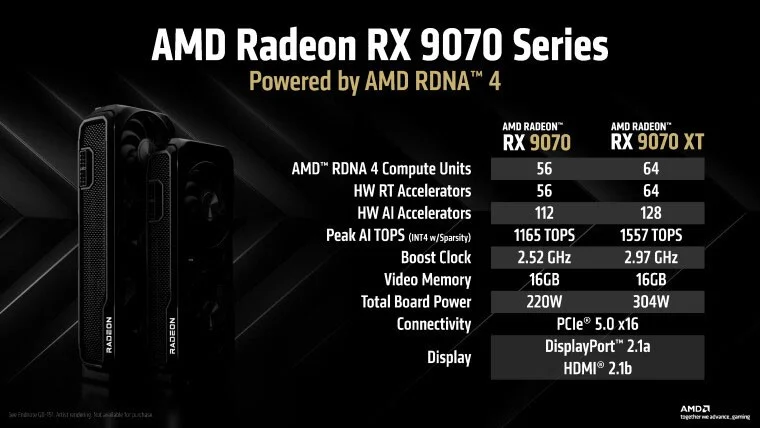
In addition, “Team Red” has also posted a new support document on its website, sharing information regarding UEFI (Unified Extensible Firmware Interface) support on the latest RX 9000 series graphics cards. AMD launched the 9070 series GPUs last week to compete with Nvidia’s RTX 5070/Ti cards. The initial response seems to be quite positive as the company promises performance close to the RTX 5070 Ti at a price just a little higher than the RTX 5070. In addition to gaming, AI/ML performance and media encoding/decoding are also significantly improved.

AMD Officially Requires Windows 11 for Latest Graphics Cards

In its new UEFI support document, AMD states that Radeon GPUs from the 9000 series onwards will only officially support UEFI mode. As a result, if your system is configured to use a legacy BIOS or CSM (compatibility support module), it may not work and will not boot.

This requirement is similar to Windows 11. In other words, UEFI/Secure Boot will become mandatory to enhance operating system security. In addition to security, UEFI also brings many other benefits such as Fast Boot. AMD explains:

Compared to the old "legacy" BIOS firmware, UEFI firmware offers many new and useful features, including:

  • Security is greatly improved
  • Well-defined interfaces ensure interoperability and testability
  • Reliable firmware updates from the internet with little user interaction
  • Support hard drives larger than 2.2TB
  • Support for a wide range of new PC hardware, including the ability to boot from NVMe SSDs
  • Windows® Secure Boot to prevent malware
  • Faster shutdown, startup, sleep and resume times

To take full advantage of UEFI, only UEFI mode will be officially supported starting with the 4th generation of AMD RDNA™ graphics cards (Radeon™ RX 9000 Series and later).

AMD also touts ReSizable BAR, also known as Smart Access Memory in the case of Radeon, as a UEFI benefit.

The documentation also suggests that performance and compatibility issues may occur if users do not enable UEFI firmware on their systems:

It is important that your PC is configured for UEFI mode to ensure compatibility, performance, and optimal user experience with AMD Radeon™ RX 9000 Series and newer graphics cards.

This means that unsupported devices running Windows 11 without UEFI/Secure Boot will not work optimally with Radeon 9000 series graphics cards, and therefore you should upgrade to a new PC.

Additionally, if you're wondering whether your current graphics card's VGA BIOS (vBIOS) comes with a UEFI module, you can use TechPowerUp's GPU-Z tool to check, which currently has a small catalog containing relevant information.
Sign up and earn $1000 a day ⋙

Leave a Comment

AMD, Intel from friends to enemies, together against the fear of Arm

AMD, Intel from friends to enemies, together against the fear of Arm

AMD and Intel - “Team Red” and “Team Blue”, the world's two leading semiconductor chip manufacturers, who have been sworn enemies, always competing with each other on all fronts in the “x86 arms race” for many years, have suddenly recently turned from enemies to friends.

AMD Ryzen Master Discontinues Support for Threadripper and Ryzen 1st and 2nd Generation CPUs, Users Take Note!

AMD Ryzen Master Discontinues Support for Threadripper and Ryzen 1st and 2nd Generation CPUs, Users Take Note!

Last month, AMD released a new version of Ryzen Master, an application that helps tweak and overclock Ryzen and Threadripper-branded processors.

AMD claims upcoming chips could “outclass” rival Nvidia

AMD claims upcoming chips could “outclass” rival Nvidia

It seems like AMD is trying to raise market expectations for the upcoming MI325X processor.

Intel loses $30 billion PlayStation 6 chip contract

Intel loses $30 billion PlayStation 6 chip contract

Intel has reportedly lost the race to supply processors for Sony's next-generation gaming console, the PlayStation 6.

RX 9070 XT performance gradually revealed, is it enough to make Nvidia fear?

RX 9070 XT performance gradually revealed, is it enough to make Nvidia fear?

At this year's CES 2025 event, AMD refrained from revealing long-awaited details about its new flagship Radeon RX 9070 XT GPU, which is built on the RDNA 4 architecture.

AMD Variable Graphics Memory Launched: Solution to Improve Gaming Experience on AMD CPUs

AMD Variable Graphics Memory Launched: Solution to Improve Gaming Experience on AMD CPUs

AMD Strix Point laptop users will now get a new feature called Variable Graphics Memory.

AMD wants to compete directly with Apples Max-Series M chips

AMD wants to compete directly with Apples Max-Series M chips

There have been a lot of rumors lately that AMD seems to be planning to withdraw from the GPU market.

AMD Announces Pricing and Expected Release Date for Ryzen 9 9950X3D and 9900X3D

AMD Announces Pricing and Expected Release Date for Ryzen 9 9950X3D and 9900X3D

AMD has finally announced the release date and pricing of its highly anticipated Ryzen 9000X3D processors.

AMD Sets Launch Date for Next-Generation Portable Gaming PC Chip: Z2 Extreme

AMD Sets Launch Date for Next-Generation Portable Gaming PC Chip: Z2 Extreme

MD has officially confirmed for the first time that it is working on the next generation version of its Z-series handheld gaming CPU, called the Z2 Extreme.

Intel begins to lose CPU market share in China while AMD grows strongly

Intel begins to lose CPU market share in China while AMD grows strongly

With the unimpressive performance of recent CPU generations, Intel seems to be losing popularity in the Chinese market, where rival AMD is increasingly gaining popularity.

AMD Ryzen AI 300 Series Officially Launched

AMD Ryzen AI 300 Series Officially Launched

Back in December 2023, AMD introduced the Ryz 8040 (Hawk Point) series mobile APUs, while also revealing a few brief details about the next-generation Strix Point series.

AMDs 9000-Series CPUs Are Here, But Why Not Buy Now?

AMDs 9000-Series CPUs Are Here, But Why Not Buy Now?

After a long wait, AMD has finally announced the official launch date of its first new desktop CPU line developed on the Zen 5 architecture: Ryzen 9000.

AMD Reshapes Radeon GPU Brand Segments

AMD Reshapes Radeon GPU Brand Segments

Unlike its desktop CPU division, AMD's GPU business can't seem to agree on how to name its commercial discrete cards.

AMD Ryzen 9950X3D/9800X3D on Windows 10 outperforms Windows 11 at Microsoft recommended settings

AMD Ryzen 9950X3D/9800X3D on Windows 10 outperforms Windows 11 at Microsoft recommended settings

After a long wait, the Ryzen 9 9950X3D has finally been officially launched, serving as a strategic product in AMD's top-of-the-line X3D CPU line.

10 tips to remove programs that cannot be uninstalled

10 tips to remove programs that cannot be uninstalled

A bunch of unwanted software can make your computer slow and cluttered. But cleaning it up isn't always easy. So check out these 10 ways to cleanly uninstall apps, remove old software in batches, uninstall items that can't be uninstalled, and even remove pre-installed Windows programs.

What is the ProgramData folder on Windows?

What is the ProgramData folder on Windows?

In newer versions of Windows, you'll find a folder called ProgramData on your system drive (usually C:\). However, this folder is hidden, so you can only see it if you enable displaying folders and files in File Explorer.

How to open EPUB files on Windows 10 (without Microsoft Edge)

How to open EPUB files on Windows 10 (without Microsoft Edge)

Microsoft's new Chromium-based Edge browser drops support for EPUB eBook files. You'll need a third-party EPUB reader app to view EPUB files on Windows 10. Here are some good free options to choose from.

How to fix missing Language bar on Windows 10

How to fix missing Language bar on Windows 10

Language bar disappeared on Windows 10? Follow these solutions.

How to use Storage Spaces to protect Windows 11 data

How to use Storage Spaces to protect Windows 11 data

Pooling multiple drives with Storage Spaces in Windows 11 allows users to protect files from drive failure while consolidating storage into a single, easy-to-manage virtual drive.

How to prevent Windows from locking automatically

How to prevent Windows from locking automatically

To prevent users from locking their Windows 10 computer, follow the steps below to disable the Lock Screen in Windows 10.

Turn off these 7 Windows services to extend battery life!

Turn off these 7 Windows services to extend battery life!

Turning off a few of these services can save you a significant amount of battery life without affecting your daily usage.

9 Old Windows Tools That Are Still Useful Today

9 Old Windows Tools That Are Still Useful Today

From performance monitoring to quick system tweaking, these built-in utilities are as useful as ever.

How to fix error code 0x80004005

How to fix error code 0x80004005

Error code 0x80004005 is a type of unknown Windows error, whose cause is related to a number of different issues.

How to Show the Missing Bluetooth Icon on the Windows Taskbar

How to Show the Missing Bluetooth Icon on the Windows Taskbar

If you can't find the Bluetooth icon on the taskbar, follow the steps below to show the missing Bluetooth icon on Taskbar in Windows 10.

How to Clear NVIDIA Shader Cache on Windows

How to Clear NVIDIA Shader Cache on Windows

Clearing the NVIDIA Shader Cache will reset the system, forcing it to rebuild with new data. Here are instructions for clearing the NVIDIA Shader Cache.

Summary of some simple ways to disable USB ports on Windows computers

Summary of some simple ways to disable USB ports on Windows computers

Unlocking USB ports in BIOS is not difficult. However, how to lock computer USB ports? Let's find out with Quantrimang.com!

Extremely simple tips to change IP without VPN

Extremely simple tips to change IP without VPN

Being blocked online can be frustrating, whether it's a forum lockout, a game ban, or a temporary IP restriction. The good news is that you don't always need a VPN to get around these restrictions.

How to Take Advantage of the Performance Tab in Task Manager

How to Take Advantage of the Performance Tab in Task Manager

When your computer crashes, seeing how everything is running can help you troubleshoot. And when everything is working, this information can also help you optimize your system.

5 tips to help your Windows 11 laptop battery last all day

5 tips to help your Windows 11 laptop battery last all day

Windows laptops aren't known for their battery life, at least not without some tweaking. But these tips will help your laptop last all day without having to find a power outlet.