AMD Ryzen AI 300 Series Officially Launched

Back in December 2023, AMD introduced the Ryz 8040 (Hawk Point) series mobile APUs, while also briefly revealing some information about the next-generation Strix Point series. Previously, “Team Red” wanted to follow a similar naming scheme, with the Strix Point APUs being labeled as the “Ryzen 8050 series”. However, more and more leaks are suggesting that this plan has changed, as AMD is apparently considering the “Ryzen AI” branding, in line with the explosive growth of the artificial intelligence hardware market.

At COMPUTEX 2024, AMD officially confirmed its new naming scheme for its Ryzen AI 300 series CPUs. It seems like this move is a way for AMD to separate its AI PC processors from its traditional work and gaming lineups, similar to how we have the Ryzen Threadripper line that caters solely to the HEDT (high-end desktop) segment. The announcement was made alongside the Zen5 and Zen 3-based 5000XT series processors for desktops.

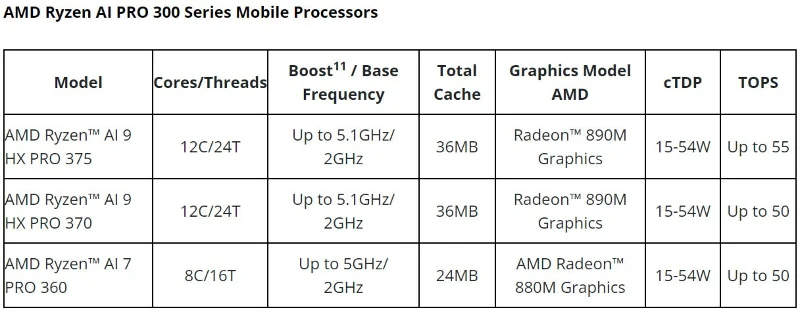
Today, after a long delay, AMD finally launched its latest 3rd generation Ryzen AI Pro 300 Series mobile processors codenamed Strix Point - as previously rumored. The lineup includes the AMD Ryzen™ AI 9 HX PRO 375, AMD Ryzen™ AI 9 HX PRO 370, and AMD Ryzen™ AI 7 PRO 360.

AMD Ryzen AI 300 Series Officially Launched
Ryzen AI Pro 300 Series

With the “Pro” suffix, these processors are primarily aimed at enterprise use, but they also promise to be great choices for anyone looking for a powerful computer. AMD has also been using the AI ​​“tagline” quite liberally lately to refer to almost any chip with an NPU. In this regard, the new processors are said to deliver three times the AI ​​performance of the previous generation, which is great for on-device AI processing needs like live captioning, language translation, and advanced AI visualization in apps like Microsoft Copilot+.

Overall, the NPU has the new XDNA 2 architecture, but it's still not as useful as AMD advertises. Most popular chatbots, like ChatGPT and Microsoft Copilot, run in the cloud, and only a few tools like LM Sudio let you run AI models entirely locally.

The more interesting aspect here is the architecture. The Ryzen AI Pro 300 series comes with the Zen 5 architecture and is built on a 4nm process, which brings improved CPU performance and extended battery life. The top-of-the-line Ryzen AI 9 HX PRO 375 boasts a 40% performance boost and is 14% faster than Intel's Core Ultra 7 165U.

Being part of the Pro family also means that these chips come with a bunch of cool add-ons. These include Cloud Bare Metal Recovery for system recovery, Supply Chain Security for enhanced traceability, and Watch Dog Timer for improved system resiliency. You probably won’t use these all that often, but they can be useful in certain situations.

The list of the first laptops to hit the market using Ryzen AI Pro 300 CPUs has not been announced yet, but will appear soon.

Leave a Comment

What Young Riders Should Know About Moving Their Motorcycles Across Cities

What Young Riders Should Know About Moving Their Motorcycles Across Cities

Long-distance travel can involve heavy traffic, changing weather conditions, and rider fatigue. If you are also dealing with the responsibilities of moving home, such as packing belongings or coordinating accommodation, a long ride may add unnecessary pressure to an already busy schedule.

Solving Microsoft Teams Shortcut Error Not Opening

Solving Microsoft Teams Shortcut Error Not Opening

Tired of Microsoft Teams shortcut error preventing you from opening the app? Follow our expert, step-by-step guide with the latest fixes for instant resolution. Works on Windows, Mac & web – no tech skills needed!

Solving Microsoft Teams Task Management Sync Error

Solving Microsoft Teams Task Management Sync Error

Tired of Microsoft Teams Task Management Sync Error halting your workflow? Follow our proven, step-by-step fixes to resolve sync issues fast and restore seamless task collaboration. No tech expertise needed!

Troubleshooting Microsoft Teams Wiki Error Formatting

Troubleshooting Microsoft Teams Wiki Error Formatting

Struggling with Microsoft Teams Wiki Error Formatting? This step-by-step guide reveals proven fixes for common wiki tab issues, ensuring smooth editing and collaboration in Teams. Get back to productive wikis fast!

How to Fix Microsoft Teams Installation Error for Linux

How to Fix Microsoft Teams Installation Error for Linux

Struggling with Microsoft Teams installation error on Linux? Discover step-by-step fixes for Ubuntu, Fedora & more. Resolve dependency issues, crashes, and errors quickly with our ultimate guide. Get Teams running smoothly today!

Solving Microsoft Teams Error Page Not Loading

Solving Microsoft Teams Error Page Not Loading

Struggling with Microsoft Teams "Error Page" not loading? Get step-by-step fixes for desktop, web, and mobile. Solve Microsoft Teams Error Page issues quickly and resume seamless teamwork today.

Solving Microsoft Teams Error Screenshot Issues

Solving Microsoft Teams Error Screenshot Issues

Tired of Microsoft Teams "Error Screenshot" blocking your workflow? Get proven, step-by-step solutions to resolve screenshot errors in Teams instantly and boost productivity. No tech skills needed!

How to Fix Microsoft Teams Error U User

How to Fix Microsoft Teams Error U User

Tired of Microsoft Teams "Error U" User blocking your chats? Get proven, step-by-step fixes to clear cache, reset, and restore seamless collaboration instantly.

Where are Microsoft Teams Registry Keys Located on Windows 11?

Where are Microsoft Teams Registry Keys Located on Windows 11?

Unlock the precise locations of Microsoft Teams registry keys on Windows 11. Step-by-step guide to find, access, and safely tweak them for optimal performance and troubleshooting. Essential for IT pros and Teams enthusiasts.

How to Fix Microsoft Teams Training Error Video Lag

How to Fix Microsoft Teams Training Error Video Lag

Tired of Microsoft Teams "Training Error" Video Lag ruining your meetings? Follow our step-by-step guide with the latest fixes for smooth video calls—no more frustration!