5 Halloween Cocktails That Are Easy to Serve at Your 2026 Bash

Mix five vivid, approachable Halloween cocktails with measured recipes, simple prep tips, and an alcohol-free option for your party guests.
AMD and Intel - “Team Red” and “Team Blue”, the world’s two leading semiconductor chip manufacturers, who have been sworn enemies, always competing with each other on all fronts in the “x86 arms race” for many years, have suddenly turned from enemies to friends recently. Indeed, the strong rise of the ARM platform essentially threatens the survival of both AMD and Intel. The saying “there are no permanent enemies, only permanent interests” has once again proven to be correct.
ARM architecture is fundamentally much more efficient than x86. That’s why it’s been the foundation of mobile phone chipsets for the longest time, and is slowly making its way into PCs. While Intel’s x86 chips were the dominant force in the desktop and server space about a decade ago, that’s been changing rapidly in the past few years. First, Apple itself ditched Intel in favor of ARM-based M-series silicon. And now Microsoft has started showing off some Copilot+ PCs running on Qualcomm-made ARM chips. There’s no room for AMD or Intel.
This is an existential threat, and it seems like AMD and Intel are finally admitting that they have a common enemy.
Today, in a promising joint agreement, AMD and Intel jointly announced a project called the x86 Ecosystem Advisory Group, created to improve the x86 platform and AMD64 (the 64-bit version of x86 that AMD licenses to Intel), as well as the entire ecosystem of software and hardware that depend on it.
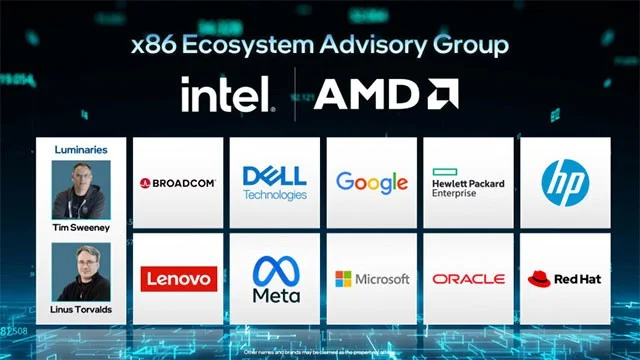
In a press release, AMD and Intel outlined the key highlights and goals behind the creation of the project. The release states:
The advisory group aims to unite industry leaders to shape the future of x86 and drive developer innovation through a more unified set of architectural interfaces and instructions. This initiative will increase compatibility, predictability, and consistency across x86 products.
To achieve this, the team will gather technical input from the x86 hardware and software communities on essential functions and features.
..
The objectives include:
Increase customer choice and compatibility across hardware and software, optimizing the ability to benefit from new, advanced features.
Simplify architectural guidelines to enhance software and interface consistency across Intel and AMD x86 products.
Enables more and more efficient integration of new capabilities into operating systems, frameworks, and applications.
Microsoft happens to be one of the founding members of this project. In addition, there are many big names in the industry such as Broadcom, Dell, Google, Hewlett Packard Enterprise, HP Inc., Lenovo, Meta, Oracle and Red Hat, and celebrities including Linus Torvalds and Tim Sweeney. The computer processor market in the coming time is expected to witness fierce competition and many unpredictable twists.
Mix five vivid, approachable Halloween cocktails with measured recipes, simple prep tips, and an alcohol-free option for your party guests.
Find 15 office-friendly Halloween costume ideas for 2026, with practical checks for dress codes, respectful themes, comfort, and workplace safety.
Plan a fun elementary school Halloween party with easy crafts, games, inclusive treats, costume tips, and a sample 75-minute classroom schedule.
Compare realistic side hustles for 2026 by startup cost, fees, flexibility, and income control, with current tax and scam guidance from official sources.
Upgrade your home office ergonomics with current OSHA and NIOSH guidance on chair fit, monitor height, laptop setup, lighting, and movement.
Learn why emotional intelligence matters in leadership, where it helps most, how to strengthen it, and how to tell whether your approach is working.
A practical roadmap for moving into tech without a degree: choose an accessible role, build job-ready skills, prove them with projects, and use hiring feedback to improve.
Build a credible LinkedIn personal brand in 2026 with current profile, content, newsletter, analytics, verification, and visibility guidance from LinkedIn.
Quiet quitting and quiet firing are catchy labels, not diagnoses. Learn what is verified, what depends on context, and what employees and managers can do next.
Fractional executives offer senior leadership without a full-time hire. Learn when the model works, what to ask, and the risks to manage.








