When to Start Decorating for Halloween in 2026

Use a simple 2026 Halloween decorating timeline for indoor décor, outdoor displays, and fresh pumpkins, with practical adjustments for weather and events.
A picture can say a thousand words. So why would you want to add text to a photo? Instagram seems to think it’s a good option to offer to all of its users.
Instagram launches new text tool for all users
As outlined in the Instagram Creator Blog post, Instagram has launched a number of new text tools designed to help creators stand out.
The standout feature is the ability to add text and stickers to photos. This means that beautiful smartphone photos can have some writing added or another photo layered over the original.
Instagram is also adding new fonts, animations, and effects that you can use in Reels and Stories, which can be combined to at least help you feel unique and stand out from the crowd.
Finally, you can now create a Carousel that holds up to 20 photos or videos. And if you apply these text tools while doing so, you can really create something awesome.
How to Use Instagram's New Text Tool
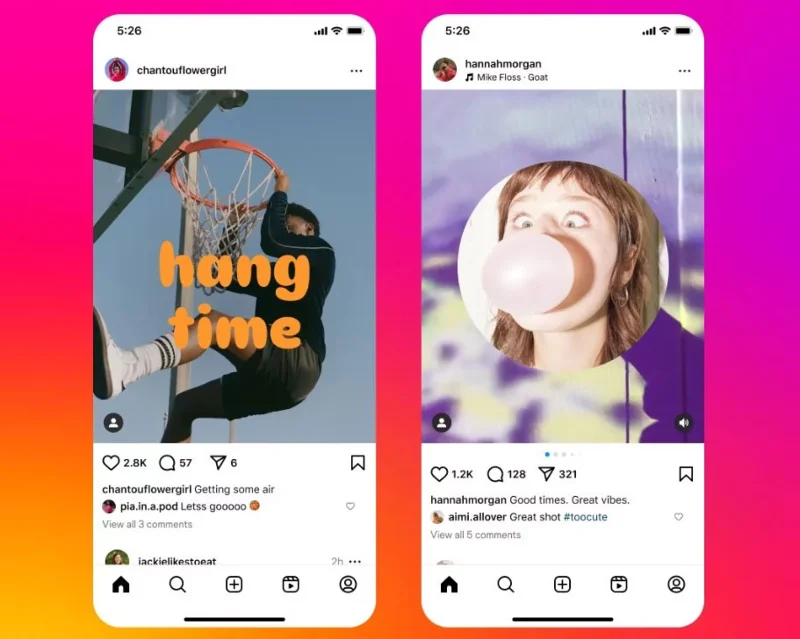
As you'd expect, using Instagram's new text tool is straightforward and user-friendly.
To add text to a photo, just tap the Text button after selecting the photo you want to post to your feed. And to layer another photo on top as a sticker, tap the Gallery button in the top right corner of the screen. You can then change the shape of the sticker by tapping on it.
To see the new fonts, open the Text tool and tap the Text button . Once you find a sticker you like, you can animate it or add effects.
To create a longer Carousel, tap Post and add as many photos or videos as you like (up to 20).
Previously, you could add text and stickers to your photos, but only if you used a third-party app like Canva before uploading the photo to Instagram. Now, thanks to these new text tools for creators, you can edit your photos right within the Instagram app.
Use a simple 2026 Halloween decorating timeline for indoor décor, outdoor displays, and fresh pumpkins, with practical adjustments for weather and events.
Mix five vivid, approachable Halloween cocktails with measured recipes, simple prep tips, and an alcohol-free option for your party guests.
Find 15 office-friendly Halloween costume ideas for 2026, with practical checks for dress codes, respectful themes, comfort, and workplace safety.
Plan a fun elementary school Halloween party with easy crafts, games, inclusive treats, costume tips, and a sample 75-minute classroom schedule.
Compare realistic side hustles for 2026 by startup cost, fees, flexibility, and income control, with current tax and scam guidance from official sources.
Upgrade your home office ergonomics with current OSHA and NIOSH guidance on chair fit, monitor height, laptop setup, lighting, and movement.
Learn why emotional intelligence matters in leadership, where it helps most, how to strengthen it, and how to tell whether your approach is working.
A practical roadmap for moving into tech without a degree: choose an accessible role, build job-ready skills, prove them with projects, and use hiring feedback to improve.
Build a credible LinkedIn personal brand in 2026 with current profile, content, newsletter, analytics, verification, and visibility guidance from LinkedIn.
Quiet quitting and quiet firing are catchy labels, not diagnoses. Learn what is verified, what depends on context, and what employees and managers can do next.








