4 VPNs That Dont Require Login or Registration
Want to get the benefits of a VPN without signing up for an account? Believe it or not, there are options out there.
Whether you’re looking to bypass geo-restrictions on streaming platforms or protect your online privacy, a good VPN is all you need. However, not all VPNs are created equal, and that’s especially true for free services. And the truth is, unless you’re careful, a free VPN can do more harm than good. That’s why you should check these features before signing up for any free VPN.
1. Number of servers
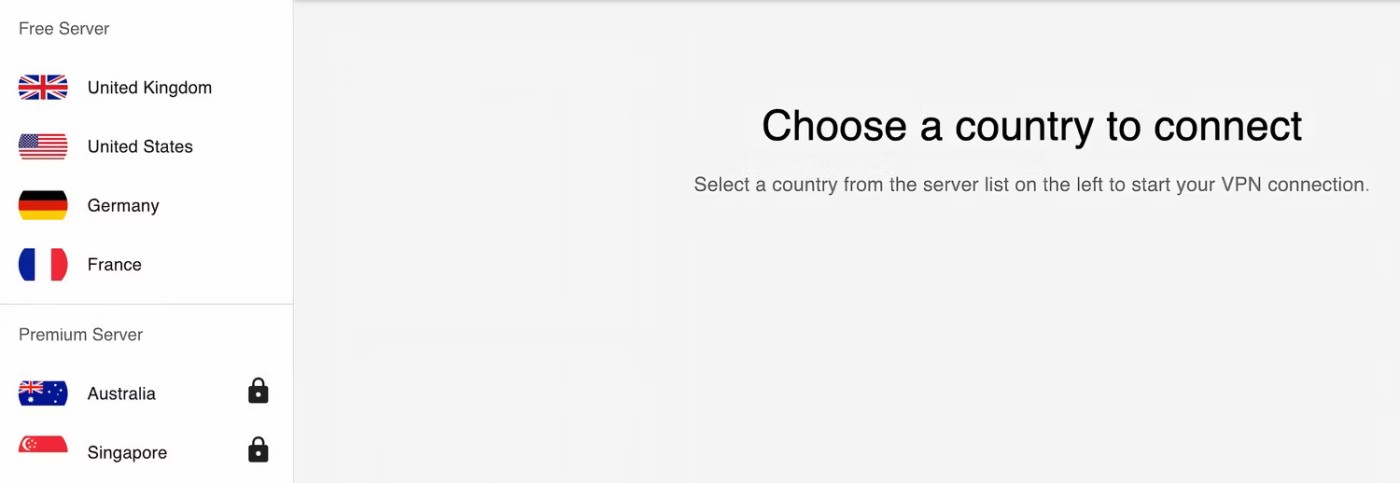
The best VPN services will advertise the number of servers they offer in a central location. While this may seem like a marketing ploy to get you to sign up for their service, the reality is that this is an important metric to consider before you sign up for any VPN.
In the case of free services, you will find that they do not offer access to as many servers as paid VPNs. However, the limited number of servers can be a problem, as this means that more users will be routed through the same few servers, which can lead to unstable connections and slower speeds. While you are unlikely to find any free VPN service that offers hundreds of servers like a paid provider, it is worth choosing a service that offers the highest number of servers.
2. Automatic Kill Switch

Let’s say you’re traveling abroad and need to log into your bank account to transfer money. You’re in a coffee shop and decide to use public Wi-Fi, thinking that a VPN will keep your details safe. Unfortunately, as soon as you log into your account, the VPN disconnects. Now you’re connected to Wi-Fi, but without the protection of a VPN. In such a case, hackers monitoring the network can easily intercept your details.
If you want to avoid this happening to you, look for a free VPN provider that offers an automatic Kill Switch. This feature will cut off your internet access if your VPN connection drops for any reason. In turn, this will prevent unauthorized parties from accessing your data.
3. Logging Policy
Using a VPN means that your ISP and any other third parties can't track your browsing history. But your VPN provider can track you, which is why it's important to check the company's privacy policy and no-logs policy, in particular, before you sign up for any free service.
No-log VPNs do not collect or store any traffic that passes through their network. The only problem is that you, as a user, have no way to verify whether a VPN provider’s claims are accurate. That’s why you should always rely on independent, third-party audits and reviews to confirm a provider’s data retention claims. With free VPNs, this becomes even more important, as these services may try to monetize your data by selling it to advertisers or other third parties.
4. Streaming Limits

While free VPNs can still provide you with a secure connection for browsing the web, one downside is that they can’t unblock streaming content. If you’re looking for a free VPN service solely to access geo-restricted streaming content, be sure to check the VPN provider’s claims and user reviews to see if the service can actually bypass those restrictions effectively.
5. Pop-up ads
It’s not uncommon for free VPNs to display ads. After all, these services need to make money. However, some free services go overboard with ads, displaying them all over the interface. Some even inject ads into your browser.
So, it’s worth trying out a few free VPN services to see how prevalent the ads are. If the ads are too annoying, switch to another service. Proton VPN is by far the best service for keeping your browsing experience ad-free. The only downside is that you have a limited number of servers to choose from.
Considering these factors will help you make an informed decision when choosing a VPN provider. While free options can be useful, always prioritize your security when choosing a service.
Want to get the benefits of a VPN without signing up for an account? Believe it or not, there are options out there.
One benefit of using a virtual private network (VPN) is that it masks your real location. But if that's your main goal, you might be surprised to learn that some apps can still see your real location.
VPN (Virtual Private Network) is simply understood as a virtual private network system, capable of creating a network connection based on a certain service provider.
One of the world's most popular VPN services - ExpressVPN - has officially launched an app version for Windows PCs running on ARM-based processors.
Switching to VPNs has completely changed the online privacy of many people, but there are a few things you need to know before you start using them.
To really understand whether a VPN is right for you, there’s no better way than to try it out. Install a few clients, connect to the best servers, test your favorite sites, and see how they perform.
VPNs have a number of advantages, such as protecting your online identity and allowing you to access content in other countries. You may even experience faster connection speeds.
Mock locations and VPNs are often used interchangeably when discussing online privacy and security, but they are not the same.
When you turn on a VPN, your internet connection is encrypted, making it harder for snoopers—like your ISP (Internet Service Provider)—to monitor what you're doing. But what exactly does your ISP see after you turn on a VPN?
Back in 2023, Microsoft launched a new feature for Microsoft Defender users called Privacy Protection.
Discover how to use a VPN with Caesars Sportsbook to access your favorite sports betting platform while traveling outside the U.S.
Discover top Chrome extensions that change your IP address and enhance your privacy. Explore options like ExpressVPN and GeoProxy for safer browsing.
Understanding the difference between a VPN and a firewall, as well as why using them together provides better security, will help keep you safe.
A good VPN will improve every aspect of gaming. For example, by using a VPN to mask your location, you can play geo-restricted games.
Tired of Microsoft Teams shortcut error preventing you from opening the app? Follow our expert, step-by-step guide with the latest fixes for instant resolution. Works on Windows, Mac & web – no tech skills needed!
Tired of Microsoft Teams Task Management Sync Error halting your workflow? Follow our proven, step-by-step fixes to resolve sync issues fast and restore seamless task collaboration. No tech expertise needed!
Struggling with Microsoft Teams Wiki Error Formatting? This step-by-step guide reveals proven fixes for common wiki tab issues, ensuring smooth editing and collaboration in Teams. Get back to productive wikis fast!
Struggling with Microsoft Teams installation error on Linux? Discover step-by-step fixes for Ubuntu, Fedora & more. Resolve dependency issues, crashes, and errors quickly with our ultimate guide. Get Teams running smoothly today!
Struggling with Microsoft Teams "Error Page" not loading? Get step-by-step fixes for desktop, web, and mobile. Solve Microsoft Teams Error Page issues quickly and resume seamless teamwork today.
Tired of Microsoft Teams "Error Screenshot" blocking your workflow? Get proven, step-by-step solutions to resolve screenshot errors in Teams instantly and boost productivity. No tech skills needed!
Tired of Microsoft Teams "Error U" User blocking your chats? Get proven, step-by-step fixes to clear cache, reset, and restore seamless collaboration instantly.
Unlock the precise locations of Microsoft Teams registry keys on Windows 11. Step-by-step guide to find, access, and safely tweak them for optimal performance and troubleshooting. Essential for IT pros and Teams enthusiasts.
Tired of Microsoft Teams "Training Error" Video Lag ruining your meetings? Follow our step-by-step guide with the latest fixes for smooth video calls—no more frustration!
Frustrated by Microsoft Teams "Error occurred" during sign-in? Discover proven, step-by-step fixes to get back online fast. Clear cache, reset app, and more for seamless login. Works on Windows, Mac & web.
Struggling with Microsoft Teams "Call Error" Disconnecting? Discover proven, step-by-step fixes for call drops, network issues, and more. Get back to seamless meetings fast with our expert troubleshooting guide.
Stuck in Microsoft Teams Error 2603 login loop? Get proven step-by-step fixes to resolve the issue fast and restore seamless teamwork. Clear cache, reset, reinstall – all covered!
Tired of Microsoft Teams voice call errors? Follow our step-by-step guide to troubleshoot no audio, echo, or call drops. Proven fixes for crystal-clear calls every time.
Struggling with Microsoft Teams "Workflows Error" in Power Automate? Discover proven, step-by-step fixes to resolve connection issues, permissions, and more. Get your workflows running smoothly today!
Tired of Microsoft Teams crashes, black screens, and sign-in loops? Unlock Reddit's most popular, proven fixes to resolve common Microsoft Teams errors quickly and get back to productive meetings. Step-by-step guides inside!