5 Halloween Cocktails That Are Easy to Serve at Your 2026 Bash

Mix five vivid, approachable Halloween cocktails with measured recipes, simple prep tips, and an alcohol-free option for your party guests.
A new attack campaign that spreads malware through Google search results has been discovered by security experts from Palo Alto Networks.
Table of Contents
Hackers have been impersonating GlobalProtect VPN software, placing ads on Google Search to lure users to malicious websites, according to a report by Palo Alto Networks' Unit 42 cybersecurity department.
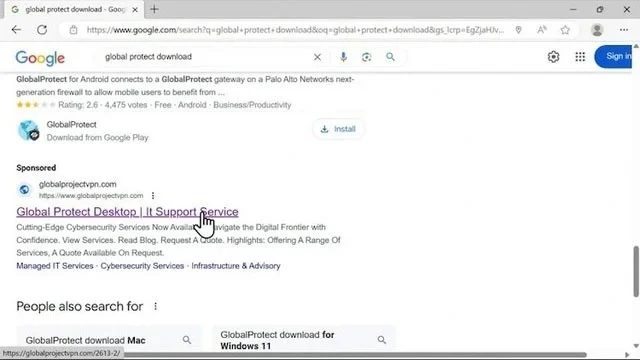
When users visit this website, they are tricked into downloading a malware downloader called WikiLoader, disguised as GlobalProtect software. WikiLoader then downloads other malicious code, which steals information and allows hackers to control the device remotely.
According to researchers, hackers' attack tactics have changed to expand the range of potential victims, from traditional phishing attacks to SEO (Search Engine Optimization).
WikiLoader has been active since late 2022. To bypass security measures, hackers have been constantly updating the malware.
Experts advise users to be cautious when downloading software from the Internet, especially from Google search results. Always double-check the source and authenticity of the website before downloading any files.
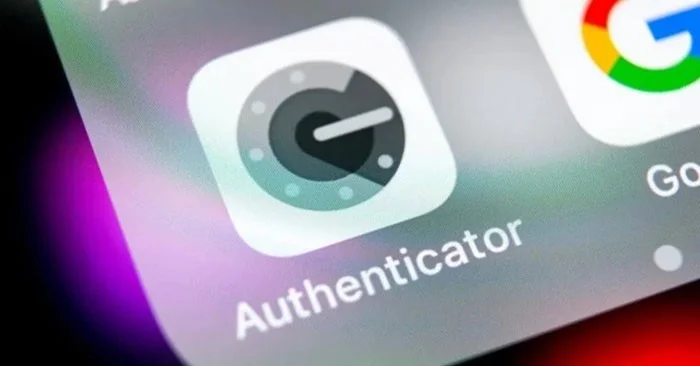
The Department of Information Security - Ministry of Information and Communications warns users to be wary of scams that lure victims into downloading software containing malicious code through advertisements that encourage users to download the Google Authenticator application to increase security for personal devices in cyberspace.
Specifically, the scammers created websites with fake domain names, inserting sponsored ads so that when people look up information, the search results appear at the top of the page. To make users subjective and easily fall into the trap, these websites also contain fake Google certificates.
If users click on the above ads, they will be redirected to a fake Google website with the link "chromeweb-authenticators.com". When users click, the fake application will be automatically downloaded from the open source code hosting service Github, then attack the victim's devices, stealing important information and data.
The Department of Information Security - Ministry of Information and Communications recommends that people be vigilant when looking up and downloading security applications. You should only download applications from the Play Store (CH Play) system for Android operating systems and the App Store for iOS operating systems. Absolutely do not download applications from unknown sources or unofficial websites.
Security researchers have recently discovered a new malware called 'Mamont', which can impersonate Google Chrome to trick people into stealing information.
Mamont hides itself by impersonating the popular Google Chrome web browser to steal information such as passwords, texts, photos and contacts from users. Experts say the malware currently targets only Russian speakers, but the threat actors behind 'Mamont' will quickly expand their targets.

Online fraud tactics using the 'Mamont' malware are becoming increasingly sophisticated. Fraudsters often use rented or purchased bank accounts to conduct suspicious transactions and launder money. They post information on forums and social networks about renting/buying accounts or approach low-income workers, students... to rent them to open bank accounts for prices ranging from 500,000 to 1 million VND per account.
This malware has the same icon as Chrome, which makes it easy for users to get confused and fall for it.
To avoid becoming a victim of personal information theft and malware, people should be cautious with strange links and not provide sensitive personal information such as citizen identification numbers, credit card numbers, bank account numbers, OTP codes, etc. In addition, users should absolutely not download software of unknown origin and should pay attention to the permissions that the application requires when installing.
Mix five vivid, approachable Halloween cocktails with measured recipes, simple prep tips, and an alcohol-free option for your party guests.
Find 15 office-friendly Halloween costume ideas for 2026, with practical checks for dress codes, respectful themes, comfort, and workplace safety.
Plan a fun elementary school Halloween party with easy crafts, games, inclusive treats, costume tips, and a sample 75-minute classroom schedule.
Compare realistic side hustles for 2026 by startup cost, fees, flexibility, and income control, with current tax and scam guidance from official sources.
Upgrade your home office ergonomics with current OSHA and NIOSH guidance on chair fit, monitor height, laptop setup, lighting, and movement.
Learn why emotional intelligence matters in leadership, where it helps most, how to strengthen it, and how to tell whether your approach is working.
A practical roadmap for moving into tech without a degree: choose an accessible role, build job-ready skills, prove them with projects, and use hiring feedback to improve.
Build a credible LinkedIn personal brand in 2026 with current profile, content, newsletter, analytics, verification, and visibility guidance from LinkedIn.
Quiet quitting and quiet firing are catchy labels, not diagnoses. Learn what is verified, what depends on context, and what employees and managers can do next.
Fractional executives offer senior leadership without a full-time hire. Learn when the model works, what to ask, and the risks to manage.








