
Why is Infostealer malware the biggest new malware concern?

In recent years, people have been particularly wary of one type of malware: Infostealer. Often distributed as a malware-as-a-service, infostealer malware is often used to steal data, remaining hidden for as long as possible — and that's just one of the problems it can cause.

5. Infostealer malware targets private data

The first reason people are worried about infostealer malware is that in 2024, it caused a leak of 3.9 billion passwords in just one year! Security research firm KELA revealed the staggering figure in its State of Cybercrime 2024 report, along with the information that over 4.3 million devices were infected with infostealer malware.
Why is Infostealer malware the biggest new malware concern?

Then another security research firm, Huntress, released its 2025 Cyber ​​Threat Report — and revealed that by 2024, ransomware will account for a staggering 25% of cyber attacks.

So while attackers have been using infostealer malware for a long time, it's only in the last few years that it's really ramped up.

4. Infostealer can silently steal a wide variety of sensitive data in large quantities

Another concern is that infostealers steal data extracted from multiple accounts of a single person. They can steal a lot of your sensitive data, including:

  • Personal data (address, phone number, social security number)
  • Email and chat logs
  • Browser data (history, cookies, bookmarks)
  • Financial information (bank details, credit card numbers)
  • Login information (username and password)
  • Cryptocurrency Account
Why is Infostealer malware the biggest new malware concern?

Some infostealer malware logs your keystrokes, like a snake keylogger, while others have clipboard hijacking capabilities to steal information you copy to your device's clipboard. Others have file harvesting components that go through your files and emails, and most have a screen capture feature that takes screenshots of you entering login credentials or having sensitive personal information on screen.

What's worse is that this infostealer can silently infect your system and do all this secretly without you even realizing anything suspicious is going on. Attackers also use advanced obfuscation techniques to avoid detection.

3. The threat of information theft is everywhere

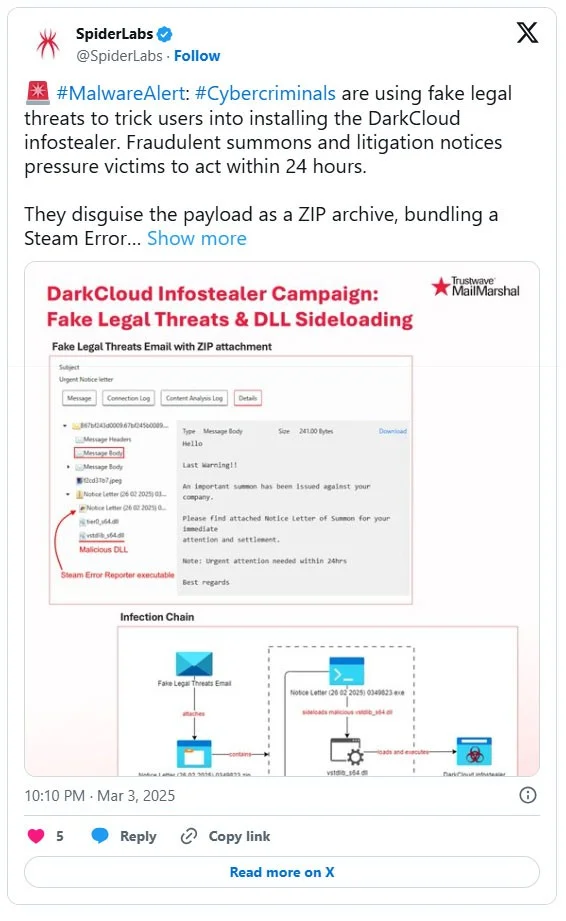
Infostealer is distributed using both phishing and non-phishing methods, and is carried out on almost every popular platform. You'll see hackers trying to lure you into downloading infostealer malware on video-sharing sites like YouTube , social media apps like Facebook and LinkedIn , as well as fake email attachments or human-like verification pages.

Pirated software is the primary source of infostealer malware, as you might expect. However, there have also been examples of infostealer malware embedded in stolen software uploaded to legitimate websites. In February 2025, a game uploaded to Steam, PirateFi, was found to contain infostealer malware. Although Valve, the owner of Steam, quickly removed the free game from its platform, it had already infected hundreds of computers.

Why is Infostealer malware the biggest new malware concern?

2. Malware infostealer is often used as a gateway for larger attacks

This is something to be really concerned about. Many sinister cybercrime attacks can be traced back to an initial infostealer infection. The malware acts as a reconnaissance tool for hackers to launch larger attacks, using the data gathered and initial access gained by infostealer.

For example, once hackers infect your work device with infostealer, they can steal your company credentials and gain access to your organization’s network. They can then scan your system for other valuable data or install backdoors and remote access tools. Finally, they can steal a bunch of your company’s data or encrypt it to cripple your operations and demand a ransom.

1. The threat of information theft is expected to increase

Widespread Infostealer infections are creating a global malware epidemic. According to Check Point’s 2025 Cybersecurity Report, Infostealer malware has increased by 58%, with organizations in Europe, the Middle East, and Africa seeing a huge increase in attacks. Other continents are also facing the problem of information theft. For example, a campaign distributing InfoStealer SYS01 malware impacted millions of people globally, spanning regions including Australia, Asia, North America, and Europe.

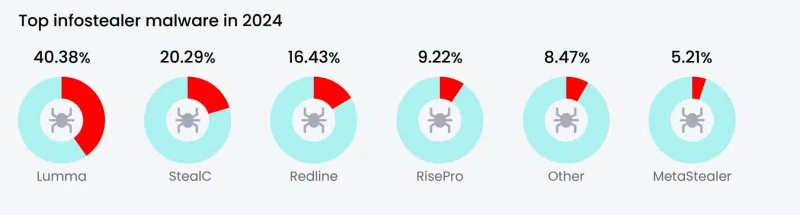
With advanced obfuscation techniques and the use of AI to enhance phishing campaigns, the threat of information theft is expected to continue to grow in scale and sophistication. Infostealers like the infamous Lumma strain are expected to continue to plague individuals and businesses, so it is important to remain vigilant.

Malware infostealer isn't the only threat we face online. But it's certainly the one we should be most worried about right now!

Leave a Comment

Cybercriminals are spreading malware using... Google Search

Cybercriminals are spreading malware using... Google Search

A new attack campaign that spreads malware through Google search results has been discovered by security experts from Palo Alto Networks.

How to know if a link is safe or not?

How to know if a link is safe or not?

Nowadays, malicious links appear more and more and are shared through social networks at a dizzying speed. Just clicking on a malicious link can bring potential dangers to you.

Scammers are spreading malware through... physical mail

Scammers are spreading malware through... physical mail

Some crafty scammers have figured out how to trick people into installing malicious apps that steal their banking details, and it all starts with a hand-delivered letter in the post.

New ransomware strain discovered that specializes in stealing login information from Chrome browser

New ransomware strain discovered that specializes in stealing login information from Chrome browser

A new strain of ransomware called Qilin has been discovered using a relatively sophisticated, highly customizable tactic to steal account login information stored in the Google Chrome browser.

Microsoft Outlook Contains a Critical Vulnerability That Could Easily Spread Malware

Microsoft Outlook Contains a Critical Vulnerability That Could Easily Spread Malware

Microsoft has just officially warned users about the existence of a vulnerability that could allow hackers to easily spread malware through the Outlook email application.

More than 200 apps containing malicious code were discovered and downloaded millions of times on the Google Play Store.

More than 200 apps containing malicious code were discovered and downloaded millions of times on the Google Play Store.

A cybersecurity firm has discovered a huge number of Android apps containing malicious code (adware), a discovery that also raises big questions about how Google monitors its online store.

Should You Use Public Wi-Fi in 2025?

Should You Use Public Wi-Fi in 2025?

Nowadays, free wifi networks are installed everywhere, from coffee shops, amusement parks, shopping malls, etc. This is very convenient for us users to be able to connect to the network everywhere to surf Facebook and work. However, is using free wifi safe?

How do criminals use CAPTCHAs to spread malware?

How do criminals use CAPTCHAs to spread malware?

Unfortunately, bad actors know this and have created fake CAPTCHAs that will infect your PC with malware.

Hackers Use Malicious Google Ads to Steal Users Microsoft Accounts

Hackers Use Malicious Google Ads to Steal Users Microsoft Accounts

There is a dangerous trend being deployed by the global hacker community, which is abusing the Google Ads platform to spread malicious code.

Stuxnet: The Worlds First Terrifying Digital Weapon

Stuxnet: The Worlds First Terrifying Digital Weapon

Stuxnet is a malicious computer worm that was first discovered in June 2010 after it paralyzed Iran's nuclear facilities. And to this day, Stuxnet is still a terrifying obsession for the global Internet.

Modern malware has more sophisticated ways of hiding

Modern malware has more sophisticated ways of hiding

Why is new malware being developed to hide from users, and what does that say about the current cybercrime world?

How to Protect Yourself from the Latest WordPress Malware Attack

How to Protect Yourself from the Latest WordPress Malware Attack

As one of the most popular website building tools in the world, WordPress is once again a target for malware.

Nearly Half of Steam Gamers Still Use Windows 10

Nearly Half of Steam Gamers Still Use Windows 10

Even though Windows 10 will stop being supported after October 14, 2025, many Steam users are still using the operating system.

How to Find and Remove Keyloggers Completely from Your Computer

How to Find and Remove Keyloggers Completely from Your Computer

Keyloggers are extremely dangerous programs that hackers install on any user's system with the aim of stealing passwords, credit card information, etc. Keyloggers store all the keystrokes that users perform on the computer and provide hackers with important user information.

How to Fix Microsoft Teams Check Version Error

How to Fix Microsoft Teams Check Version Error

Tired of the frustrating Microsoft Teams "Check Version" error blocking your meetings? Follow our proven, step-by-step fixes to resolve it fast and restore smooth teamwork. Works on latest versions!

How to Remove and Change a Microsoft Teams Account on Windows 11

How to Remove and Change a Microsoft Teams Account on Windows 11

Struggling with the wrong Microsoft Teams account on Windows 11? Discover simple, step-by-step instructions to remove and change your Microsoft Teams account effortlessly. Perfect for managing work and personal profiles!

How to Fix Microsoft Teams Guide Tutorial Error

How to Fix Microsoft Teams Guide Tutorial Error

Struggling with Microsoft Teams "Guide" Tutorial Error? Discover simple, step-by-step fixes to resolve it quickly. Clear cache, update, and more for seamless teamwork. Updated for latest versions!

Troubleshooting Microsoft Teams For Mac Sync Error

Troubleshooting Microsoft Teams For Mac Sync Error

Struggling with Microsoft Teams for Mac sync errors? Follow this ultimate troubleshooting guide with step-by-step fixes to resolve sync issues quickly and get back to seamless collaboration on macOS. Updated with the latest solutions.

Solving Microsoft Teams Website Error Loading

Solving Microsoft Teams Website Error Loading

Tired of the frustrating Microsoft Teams "Website Error" loading issue? Follow our proven, step-by-step fixes to resolve it fast and restore smooth teamwork. Works on all browsers!

Troubleshooting Microsoft Teams Remote Control Error

Troubleshooting Microsoft Teams Remote Control Error

Struggling with Microsoft Teams Remote Control Error? Discover step-by-step troubleshooting for Remote Control issues in Teams. Quick fixes, common causes, and expert tips to get back to seamless collaboration. Updated with the latest solutions.

Solving Microsoft Teams Media Error Microphone

Solving Microsoft Teams Media Error Microphone

Struggling with Microsoft Teams "Media Error" Microphone? Get instant fixes for crystal-clear audio. Step-by-step solutions for permissions, drivers, and more – no tech skills needed!

How to Fix Microsoft Teams Error on Desktop Shortcut

How to Fix Microsoft Teams Error on Desktop Shortcut

Tired of the frustrating Microsoft Teams "Error" on your desktop shortcut? Discover proven, step-by-step solutions to resolve it fast and restore smooth teamwork. No tech skills needed!

Troubleshooting Microsoft Teams Error P Password

Troubleshooting Microsoft Teams Error P Password

Stuck with Microsoft Teams "Error P" password error? Discover quick, effective troubleshooting steps to resolve login issues and get back to seamless collaboration in minutes. Updated with the latest fixes.

How to Fix Microsoft Teams Welcome Screen Stuck Error 2026

How to Fix Microsoft Teams Welcome Screen Stuck Error 2026

Frustrated with Microsoft Teams "Welcome" screen stuck on Error 2026? Discover proven, step-by-step fixes to resolve it fast and get back to seamless collaboration. Updated with the latest tips!

Troubleshooting Microsoft Teams Action Required Login Error

Troubleshooting Microsoft Teams Action Required Login Error

Struggling with Microsoft Teams "Action Required" login error? Discover step-by-step troubleshooting fixes, clear cache methods, and quick solutions to get back to seamless collaboration. Updated with the latest tips for instant relief.

How to Fix Microsoft Teams Webinar Registration Error

How to Fix Microsoft Teams Webinar Registration Error

Facing Microsoft Teams Webinar Registration Error? Follow our proven, step-by-step guide to fix it quickly and get back to seamless webinar registrations. Latest troubleshooting tips included!

How to Fix Microsoft Teams Joining Error Meeting Full

How to Fix Microsoft Teams Joining Error Meeting Full

Tired of Microsoft Teams "Joining Error: Meeting Full"? Get proven, step-by-step solutions to bypass the error and join instantly. Latest fixes for seamless meetings!

Solving Microsoft Teams Recording Error: Permission Required

Solving Microsoft Teams Recording Error: Permission Required

Tired of the frustrating Microsoft Teams recording error: Permission Required? Follow our expert, step-by-step guide to regain recording access instantly with the latest Teams policies and fixes. No tech skills needed!

Troubleshooting Microsoft Teams Error Report Not Sending

Troubleshooting Microsoft Teams Error Report Not Sending

Tired of Microsoft Teams Error Report Not Sending? Discover quick, effective troubleshooting steps to resolve it fast and get back to seamless collaboration. Expert tips included!









